


Players now
0
newvs 24h ago · updates every minute
Last 7 days
Screenshots, achievements, specs, every price change and sale we've seen on Steam, and trading cards.
Loading from Steam…
Steam prices for United States (change the country in the top bar), and Steam keys from authorized stores.
Checking other stores…
Loading from Steam…
72% positive of 112 · Mostly Positive · Live from Steam
Loading reviews from Steam…
Free on Steam. The demo has its own app, so its players are counted separately.
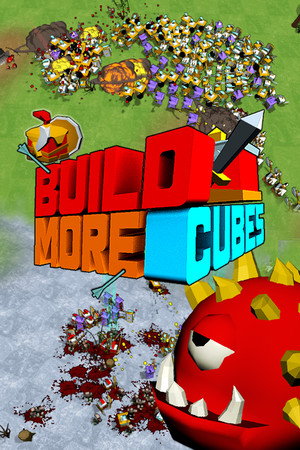
It is an army vs army game. You need to constantly rebuild and grow your army in order to survive or win the battle.
Live data from Steam, tracked by SteamPlayerBase.
What changed on Steam for this game since we started following it: prices and sales, builds, name, release date and review score.
Review score: 72% on 2026-11-01 → 72% today (112 reviews)
No authorized Steam key store lists this game right now.
Games we track that share the most Steam tags with this one.







Not tested by Valve yet. Results from Valve's own testing.
Valve hasn't published test details for this game.
Every build released on Steam for this game since we started tracking it, with the developer's patch notes. Updated within minutes of each new build.
Hey guys, I'm pleased to inform you that trading cards for BuildMoreCubes are now available. Enjoy! What is to come with the next update: - 2 new units - 5 new levels - some performance optimization and bugfixing
Hey guys, I'm pleased to inform you that trading cards for BuildMoreCubes are now available. Enjoy! What is to come with the next update: - 2 new units - 5 new levels - some performance optimization and bugfixing
First method - go to /system folder of the game and start directly buildmorecubes.exe file. That should fix the problem. Just for now you must start the game directly from buildmorecubes.exe and NOT by its steam icon. OR Second method Just find "buildmorecubes…
First method - go to /system folder of the game and start directly buildmorecubes.exe file. That should fix the problem. Just for now you must start the game directly from buildmorecubes.exe and NOT by its steam icon. OR Second method Just find "buildmorecubes…
First method - go to /system folder of the game and start directly buildmorecubes.exe file. That should fix the problem. Just for now you must start the game directly from buildmorecubes.exe and NOT by its steam icon. OR Second method Just find "buildmorecubes…
First method - go to /system folder of the game and start directly buildmorecubes.exe file. That should fix the problem. Just for now you must start the game directly from buildmorecubes.exe and NOT by its steam icon. OR Second method Just find "buildmorecubes…