Players now
0
newvs 24h ago · updates every minute
Last 7 days
Screenshots, achievements, specs, every price change and sale we've seen on Steam, and trading cards.
Loading from Steam…
Steam prices for United States (change the country in the top bar), and Steam keys from authorized stores.
Checking other stores…
Loading from Steam…
84% positive of 59 · Very Positive · Live from Steam
Loading reviews from Steam…
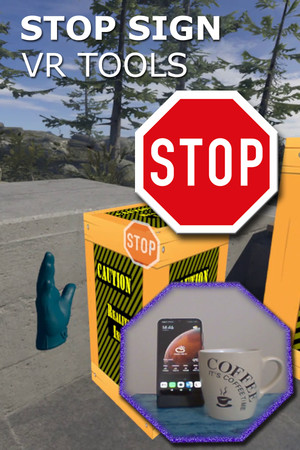
A set of tools that run in VR while you play a game: Cam Circle shows the real world in a circle in front of you. Activate it by double tapping the headset or by pressing both grip buttons. Boundary++ is a warning system showing your walls and ceiling. Boxes warn you for impacts with real objects.
Live data from Steam, tracked by SteamPlayerBase.
What changed on Steam for this game since we started following it: prices and sales, builds, name, release date and review score.
Review score: 84% on 2026-11-01 → 84% today (59 reviews)
No authorized Steam key store lists this game right now.
Every build released on Steam for this game since we started tracking it, with the developer's patch notes. Updated within minutes of each new build.
This update introduces a maximum Boundary++ segment length. Larger boundaries are split into several segments. This improves the visual quality of the boundary when used with (very) large play areas.
When using a Meta Quest connected to a PC using (Air) Link and playing a game in SteamVR, you may experience misaligned play spaces or SteamVR play areas that are larger than your physical room. Games that rely on correct play areas can become unplayable, whic…
Hi people, This update consists of one small new feature and a small fix (memory leak). Ctrl-C-C-C closes dashboard: Hit ctrl-C quickly three times to close the SteamVR dashboard. Especially useful when using Windows Mixed Reality headsets without controllers.…
After this small update you can start Stop Sign VR when SteamVR is not yet running. Stop Sign VR will start SteamVR. This is useful for users who sometimes want to run SteamVR without and sometimes with Stop Sign VR (and Boundary++). If you want to use it that…
StopSignVR / Boundary++ has been updated with: Boundary++: The amount of 'view blocking' is now configurable using the Settings Editor (the 'max opaqueness' settings). This is useful if you want to be able to see through the grid when a controller or headset i…
The “reset standing position” button on the SteamVR dashboard allows users to adjust standing position and orientation for the current SteamVR session. Unfortunately, it also caused a displacement of StopSignVR's boxes. This update fixes that and keeps the box…
Signup for emails about new features, betas, discounts, price change announcements and other news about VR apps by Reality Inside: Reality Mixer Cam Circle VR Stop Sign VR Tools more to come... You'll get an email only sporadically and your address won't be us…
A few updates: "Recalc play area" now finds the largest play area rectangle that fits within your boundaries, irrespective of your orientation and position. It can be set to find the largest rectangle at startup. For Mixed VR systems, such as WMR headsets usin…
This update improves the mapping of the real world into the virtual one, when using Cam Circle. Stereo 3D overlap is now near perfect on Valve Index headsets. On Vive Pro the stereo mapping accuracy has also improved significantly. Even the original Vive now m…
Update: The Camera Circle feature is now available for everybody. (Previously, it was in beta.) Use it for quick looks outside the headset or for picking up the controllers after putting on the headset. Cam Circle can auto-start when it detects you're wearing …
Cam Circle gives you quick and easy access to the headset camera. Just double tap the headset gently on the side to start a portal into the real world. Alternatively, you can activate Cam Circle by pressing the grip buttons on both controllers. Deactivate it i…
StopSignVR boxes can now show dynamic content from other overlay apps such as fpsVR. The boxes act as usual, including fading out when you move away from them, and (if you want) alerting you with a stop sign. There's one new configuration option for the boxes …
StopSignVR / Boundary++ has been updated with: A grey screen fix for seated games on Mixed VR sets such as an HP G2 headset with Valve Index controllers. Seated games like Moss, Hellblade: Senua's Sacrifice, DCS (Digital Combat Simulation), Apollo 11 VR and Bi…
Okay, Stop Sign VR is not itself a game, but it is used with games. It's the VR application that makes the most innovative use of SteamVR overlays. For lack of a better VR award category (there's only one), please nominate Stop Sign VR for best VR Game of the …
Take a look at Boundary++, a new feature of Stop Sign VR. Boundary++: a new warning grid system that will show up when you approach your walls and ceiling, works with native SteamVR headsets, WMR headsets and Oculus PC connected headsets, automatically imports…
Does not work on Steam Deck. Results from Valve's own testing.
Games we track that share the most Steam tags with this one.